
Account and privacy
Your BaubleStash account holds your private stash, boxes, sharing access, plan status, and catalog contributions.
See your account details
Website
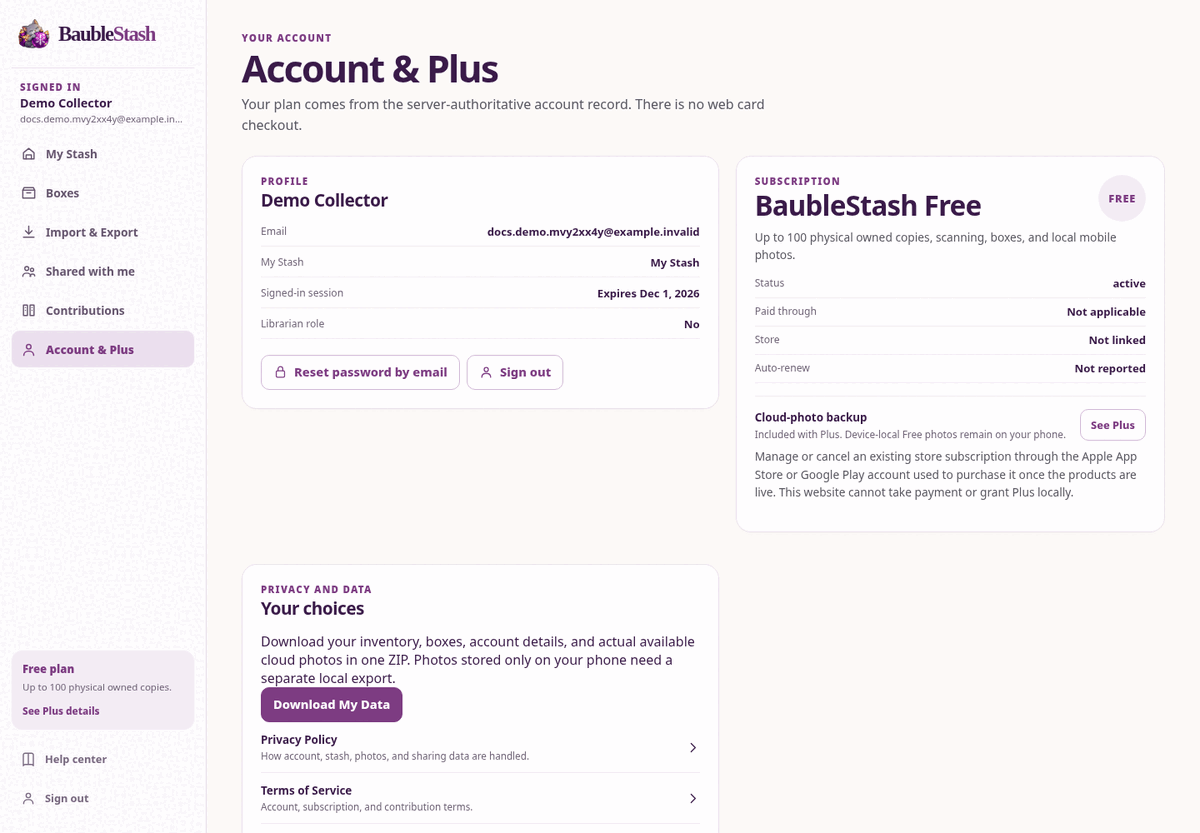
Open Account & Plus. You can see:
- Display name and email
- My Stash collection name
- When your sign-in expires
- Whether you have the Librarian role
- Plan, status, paid-through date, store, and auto-renew information
- Cloud backup status
- Links to Privacy, Terms, account deletion, and Help
Mobile app
Open More. You can see:
- Display name and email
- Sign-out control
- Plus status
- Storage summary
- Shared with me
- Cloud Photo Backup
- My catalog contributions
Change your password
Use Forgot password / Reset password by email on the sign-in screen or Account page.
BaubleStash sends an 8-digit one-time code to the account email when recovery delivery is configured. Enter the code and choose a new password. Existing sessions are revoked after a successful reset.
See Password and sign-in help.
Change your display name or email
The current consumer screens do not include a profile editor for changing your display name or email address. Do not create a second account to work around this.
Use Download My Data and Delete My Account in Account & Plus. Mobile provides these under More → Account & data, together with local photo export. Backup aging verification, legal review and a monitored recovery/support contact remain launch requirements. See Export and account deletion.
Use multiple devices
Sign in with the same email and password on each device. Your synced inventory, boxes, and sharing access appear on each device after sync.
What does not automatically appear:
- Free photos stored only on another phone
- Local changes that have not synced
- Photos from a device that has not uploaded them to Plus cloud backup
Plus cloud photos can appear on other signed-in devices when backup is enabled.
What is private
- Your ornaments and physical copies
- Your condition, notes, and boxes
- Device-local photos
- Unselected cloud photos
- Your account details
- Your subscription status
Sharing exposes only the shared My Stash collection and its cloud photos to the people you invite. Librarian review exposes only the catalog details and photos you select for contribution.
After you sign out
Website
Signing out removes your sign-in from this browser. The next person using the browser cannot open My Stash without signing in again.
Mobile app
Signing out removes your sign-in from the device. Your saved stash data may remain in the app’s private storage on this phone, but it cannot be opened without signing in.
Signing out is not the same as deleting data. Do not sign out and hand the phone to someone else if you need to protect local photos; use your device’s screen lock and account protections.